
Voice-Activated Attendance App
Point-of-service meal counts are the rule every center knows and every center struggles with. Teachers are serving food, wiping tables, and watching kids — the clipboard always loses. That’s why we built the Attendance App: your staff just says “take attendance,” and it’s recorded, time-stamped, and locked at the point of service.
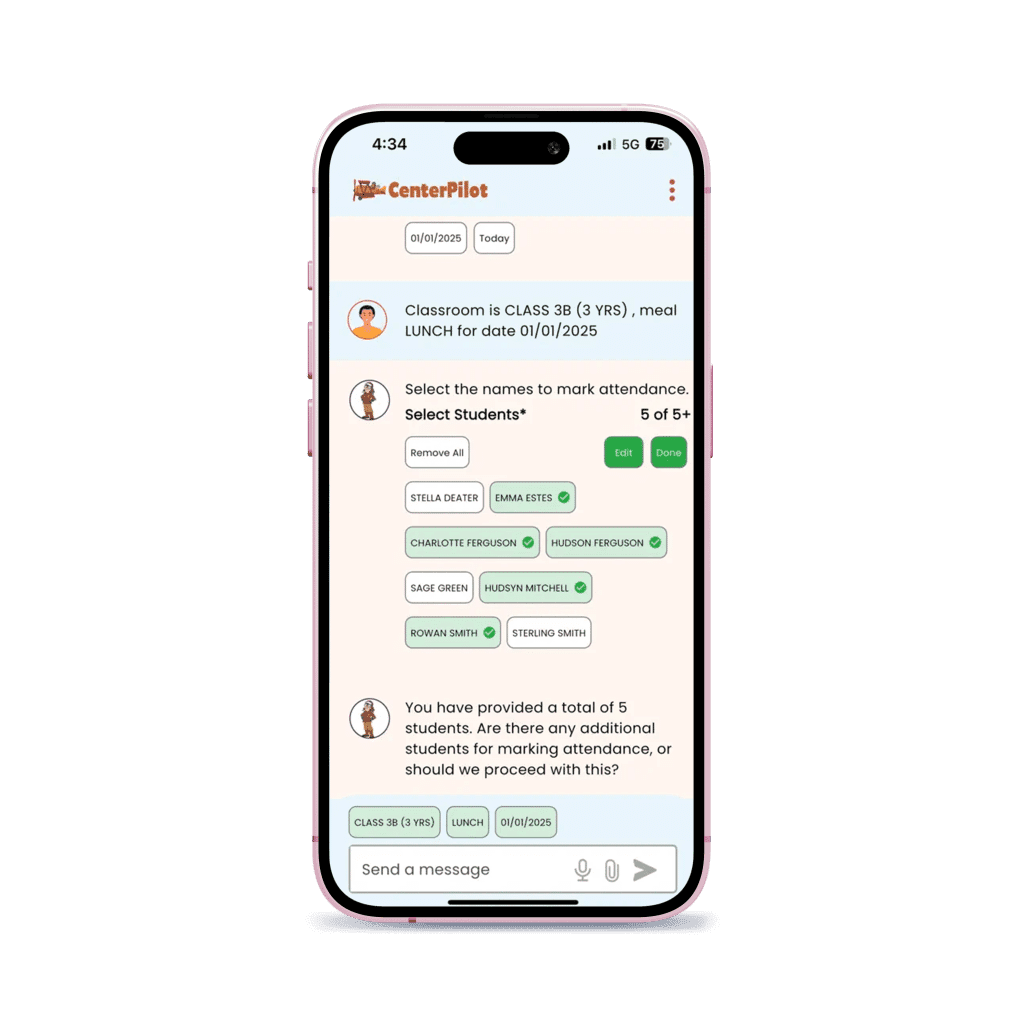
Two Ways to Take the Count
Every enabled user gets both. Staff pick whichever suits the room they are standing in.
Say it
Hands full? Say “take attendance,” answer the prompts for meal, date and classroom, then read the names as you serve.
Type it
Noisy room, or a member of staff who would rather tap? The same count can be typed, or taken by tapping names from the classroom list. It saves the same way.
What Happens at the Point of Service
All four happen at the table, while the meal is being served.
- Open the app and start the count. Staff log in with the same username and password they use on the website — no second account to remember.
- Confirm meal, date and classroom. The app asks for all three before it records anything, so a breakfast count cannot end up filed against lunch.
- Record each child by name as they are served. Each child is recorded individually rather than as a tally, which is what a reviewer asks to see.
- It is already in your claim. The count saves straight into your CenterPilot account, time-stamped, so there is nothing to sync afterwards and nothing to type up in the evening.
All four steps happen while the meal is being served, by the person serving it. That is what “point of service” means, and it is the part a paper clipboard almost never survives — not because anyone is careless, but because the clipboard is on the counter and the child is at the table.
Why Sponsors Love It
True point-of-service counts
Recorded when the meal is served, not remembered at 5 pm.
Time-stamped records
Every count carries a time and date stamp that stands up in a review.
Works site by site
Enroll only the sites that want it — $20 per site per month, on any plan.
Summer-ready
For SFSP, it even works without participant names.
Named counts, not head counts
Attendance is recorded per participant, which is the standard CACFP records are held to.
You decide who can use it
Sponsors switch it on per center and per member of staff — and switch it off the same way.
Who Can Use It, and Who Decides
Nothing turns itself on. A sponsor enables a center, then enables the individual people inside it.
The sponsor enables the center
In Facility › Facility Information › Office Use Only, a sponsor switches on the Voice and Text Attendance functions for a site. The same screen shows how many users at that site are approved, so you can always see who is actually using it.
Then the sponsor enables the people
Under Admin › Manage Facility Users, each member of staff is enabled individually. Center administrators, assistant directors, teachers and cooks can all be given access — so the person who actually serves the meal is the person who records it.
Sponsor-level logins will not work in the app. Only center-level usernames can record attendance, and only the ones a sponsor has enabled. That is deliberate: the record has to be made by someone standing in the room.
Turning it off is the same switch
Unchecking both boxes on a center stops that site using the app — and stops the $20 charge for it. To remove one person while everyone else carries on, uncheck the boxes for that single user instead. Sponsors can enable a handful of sites and leave the rest alone.
Getting the App onto a Phone
Free to download. It only does anything once your sponsor has enabled the site and the user.


Staff can also download it from the Admin menu once they are logged into their CenterPilot account. Whichever route they take, they sign in with the same username and password they already use on the website — there is no separate app account to create, and no new password for anyone to forget.
One thing worth telling staff before they open it: they will be asked which server to select. Tell them whether your account is on Hangar 1, Hangar 3 or Hangar 4 — it is the same one they use to log in on the web. If you are not sure which is yours, call us and we will look it up.
per site / month, on any plan
Attendance App questions, answered
What does the CenterPilot Attendance App do?
It records CACFP meal attendance by participant name at the point of meal service, on a phone. Staff can take the count by voice or by typing, and it saves straight into your CenterPilot account, time-stamped.
Is it only voice, or can staff type the count?
Both. Every enabled user gets voice and text entry, and the two are switched on together. Staff use whichever suits the room — hands-free while they are serving, or typing and tapping names from the classroom list when the room is noisy.
How does the voice count actually work?
Staff say "take attendance" and follow the prompts for meal, date and classroom. Then they read the participants' names as the meal is served, and each one is recorded as it is spoken.
Which CACFP programs does it work for?
It is built for the USDA Child and Adult Care Food Program generally — child care centers, Head Start, adult day care, at-risk afterschool, outside-school-hours and emergency shelters. It also handles the Summer Food Service Program, where it records counts without participant names.
Does it record names, or just a head count?
Names. Attendance is recorded per participant, which is the standard CACFP point-of-service records are held to and what a reviewer expects to see.
How much does the Attendance App cost?
It is a $20 per site per month add-on on any plan, and you enroll only the sites that want it.
Is the app required to use CenterPilot?
No. It is optional. Everything else in CenterPilot works without it, and sponsors can add it at some sites and not others.
Who is allowed to use it?
Center-level staff that the sponsor has enabled — center administrators, assistant directors, teachers and cooks can all be given access. Sponsor-level usernames will not work in the app, only center-level ones.
How do we turn it on for a center?
A sponsor enables the site under Facility, Facility Information, Office Use Only, then enables each member of staff under Admin, Manage Facility Users. Step-by-step instructions with screenshots are on our Attendance App instructions page.
How do we stop using it and stop being charged?
Uncheck the Voice and Text Attendance boxes on that center in Facility Information and save. That disables every user at the site and ends the charge for it. To remove one person and leave everyone else running, uncheck the boxes for that single user instead.
Do staff need a new username and password?
No, they use the same login they already have for the website. They will be asked which server to select the first time they sign in — Hangar 1, Hangar 3 or Hangar 4 — which is the same one they use on the web. Tell staff which one is yours before they first sign in.
Where do staff download it?
From the Apple App Store or Google Play, from centerpilot.com, or from the Admin menu once they are logged into their CenterPilot account. It is free to download, and only records once the sponsor has enabled the site and the user.
Hear it for yourself.
Book a demo and watch a meal count happen with three spoken words — then imagine your busiest classroom doing the same.